Tanks Set Out of Service with Inventory Change Between Cases
This analysis rule includes the list of tank elements that are marked as out of service, but that indicate a change in inventory from the previous case. Out-of-service tanks are not typically active inventories; therefore, any inventory change is suspect. A threshold of zero difference means that the rule has not been configured. The threshold must be greater than zero for the rule to run.
An inventory change for an out of service tank can indicate the following:
- A changed gauge, volume, mass, or density measurement
- An invalid gauge, volume, mass, or density measurement
- A tank incorrectly marked out of service
- A tank recently been brought back into service
The following table lists a sample log output for this analysis.
Analysis Method
Collect a list of all the out-of-service (OS) tank elements of the model.
Determine the tank elements with a change in measured value greater then the limit specified. If the flag for a correction is set (equals 1), then the value in the corrected value Attribute is used. The following method is used.
If abs(previous value – current value ) > absolute threshold
OR
abs( previous value – current value )/current value*100 > percent threshold
Write to the log section of the case. Report the test name and the Measurement Basis. Report the list of offending tanks, ordered by name and cause of violation.
Write to the log section of the case. Report the violating tank information.
Configuration Using the Wizard
The configuration of the Tanks Out-of-Service with Inventory Change between Cases is a selection of the General Gross Error Analysis Rule. You open the window for configuring the test (shown in the following figure) from the General Gross Error Analysis Rule Wizard.
Open the Gross Error Configuration window as described in Configuring - General Gross Error Analysis Rule.
On the Tanks tab, select Tanks set out-of-service with inventory change between cases.
A Tanks set out-of-service with inventory change between cases - Attributes window opens.
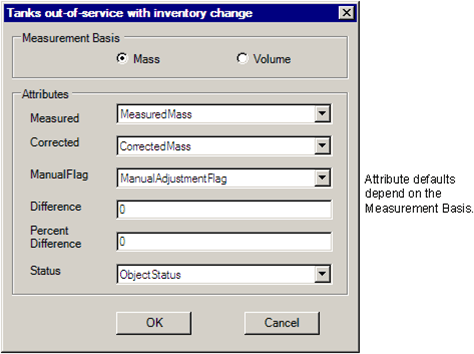
Select measurement basis and the Attributes according to the following table:
Attributes
Selections Description Measurement Basis Select either mass or volume basis. Measured Tank inventory actual measurement. The default is 'MeasuredMass' or 'NetVolume' depending on mass or volume selection. Corrected Tank inventory corrected measurement. The default is 'CorrectedMass' or 'CorrectedVolume' depending on mass or volume selection. Manual Flag Flag to indicate if a corrected measurement was used for the tank inventory. The default is to 'ManualAdjustmentFlag'. Difference Enter a value in the engineering unit of the Measured attribute. Percent Difference Enter a value in percent. Status Tank in/out of service status. The default is to 'ObjectStatus'. Click OK to finish the configuration.
The text "CONFIGURED" displays next to the 'Tanks set out-of-service with inventory change between cases' selection.
To run this test, see Running the General Gross Error Analysis.